
The best way to showcase NDIS support workers is through a mix of staff portraits, provider bio and testimonial videos, day-in-the-life films, skills-in-action clips, and short social reels. These five formats cover every stage of a participant’s decision, from first website visit to onboarding to referral, making them essential in healthcare marketing strategies where AI tools can assist in content planning and workflow management.
Each format earns its place for a different reason:
- Staff portraits — instant familiarity
- Bio and testimonial videos — spoken trust
- Day-in-the-life films — real-world context
- Skills-in-action clips — proof of capability
- Social reels — reach and recall
Professional healthcare photography and video work because they answer a question every participant and referrer is quietly asking: who is actually going to look after me? NDIS providers filming this content need to keep three things front of mind: written consent that meets NDIS obligations, captions and transcripts for accessibility, and a video-first approach that turns one shoot into a dozen usable assets.
A calm, accurate, unscripted five minutes of a support worker talking about their job does more for trust than a slick thirty-second corporate montage ever will.
Key Takeaways
Authentic, person-first video and photography of NDIS support workers builds participant and referrer trust more reliably than scripted, corporate-style content.
| Point | Details |
|---|---|
| Commission five core formats | Staff portraits, bio/testimonial videos, day-in-the-life films, skills-in-action clips, and social reels cover the full trust journey. |
| Lock in consent before filming | Written talent releases, participant consent and location sign-off must all be signed before the shoot date. |
| Build accessibility in from the start | Captions, transcripts and alt text are must-dos, not add-ons, for every published asset. |
| Plan repurposing at commission stage | One long-form interview should be scoped into short clips, a bio video and a transcript from day one. |
| Choose a partner on process, not polish | TrueCare Media evaluates safeguarding and consent workflow first, using a video-first approach to maximise every shoot for NDIS providers. |
Table of Contents
- What are the best ways to showcase NDIS support workers?
- How do you produce authentic, person-first content?
- What consent, privacy and accessibility steps come first?
- How long does a shoot take and what should it cost?
- How do you get the most value from one shoot?
- What should you hand your supplier before the shoot?
- How do you choose the right production partner?
- Ready to commission your first shoot?
- Frequently asked questions
- Sources
What are the best ways to showcase NDIS support workers?
Each format solves a different trust problem, and knowing which one to commission for which audience saves you money and produces content people actually watch.
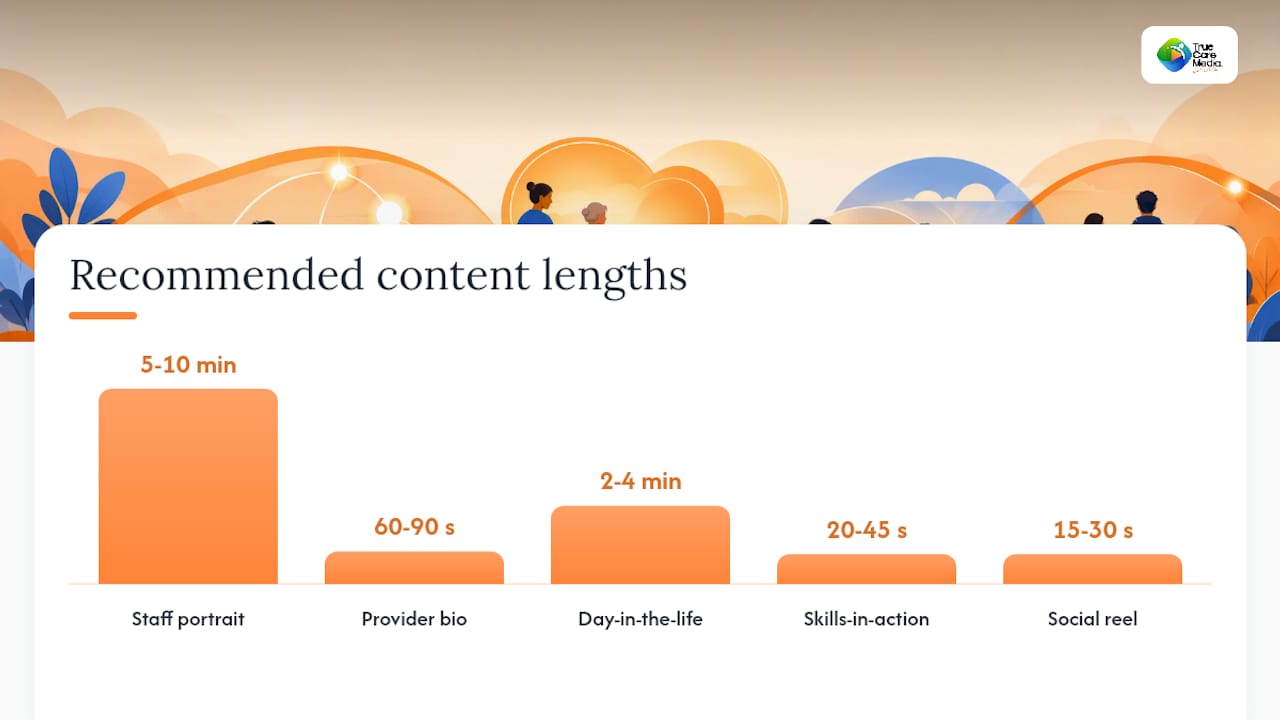
Staff portraits are simple headshots and environmental photos, usually taken in five to ten minutes per person, and they do the heaviest lifting on a website’s team page. They put a face to a name before anyone has met the person, which matters more in disability support than almost anywhere else.
Provider bio and testimonial videos run 60 to 90 seconds and rely on guided interview questions rather than scripted lines. Guided interviews improve engagement and lower pre-visit anxiety far more reliably than a worker reading from a script, because tone and warmth come through naturally under light questioning.
Day-in-the-life films run two to four minutes and follow a support worker through an ordinary shift. They suit onboarding packs and referrer emails where the reader wants to picture the actual routine.
Skills-in-action clips are short, 20 to 45 second demonstrations of a specific competency: manual handling, communication support, community access. Social reels repackage the best moments from any of the above into 15 to 30 second vertical cuts for Instagram and Facebook.
| Format | Best for | Ideal length | Typical assets |
|---|---|---|---|
| Staff portrait | Website trust, recruitment | Single image | Headshots, environmental stills |
| Provider bio/testimonial | Trust, referrers | 60 to 90 seconds | One video, transcript, thumbnail |
| Day-in-the-life | Onboarding, referrers | 2 to 4 minutes | One video, 2 to 3 stills |
| Skills-in-action | Trust, training | 20 to 45 seconds | Short clip, GIF, stills |
| Social reel | Reach, recall | 15 to 30 seconds | Multiple vertical cuts |
How do you produce authentic, person-first content?
Use conversational, guided interviews rather than scripted reads, because a support worker asked “tell me about a moment you were proud of this week” gives you something a script writer never could. This is the single biggest lever for authenticity, and it costs nothing extra to brief.
Choose natural light and a real work setting over a studio backdrop. A support worker filmed in the kitchen or lounge room they actually work in reads as credible in a way no green screen ever will. Keep wardrobe to “wear what you’d normally wear to work” and skip the styling notes altogether.
Limit retakes to two or three per question. Beyond that, answers start sounding rehearsed, and you lose the spontaneity that makes this content work in the first place. Values-driven staff videos built on real interviews outperform scripted recruitment ads for exactly this reason.
Pro Tip: Send interview questions to staff the day before, not weeks ahead. Enough notice to feel prepared, not enough to write and memorise a speech.
A supplier brief should specify:
- Deliverables and file formats expected on delivery
- Who approves footage before public use
- Whether coaching or a run-through happens on the day
- A backup plan if a participant or worker withdraws consent on the day
What consent, privacy and accessibility steps come first?
Get written, informed talent releases from every staff member and any participant appearing on camera, plus written permission from the location owner, before a single frame is shot. Skipping this step is the single most common reason NDIS providers end up pulling content after publication.
Build a short checklist before the shoot date:
- Staff talent release, signed and filed
- Participant or guardian consent form, signed and filed
- Location or facility sign-off
- Infection-control or site-access requirements confirmed with the venue
Accessibility can’t be an afterthought bolted on after editing. Every video needs captions and a full transcript, every published image needs descriptive alt text, and any explainer content should include a plain-language summary. Casting should reflect the actual diversity of the workforce and participant base you serve, not a narrow stock-photo version of it.
Pro Tip: Store every signed release in one shared folder with the shoot date and expiry terms visible in the file name. When a participant asks two years later whether their footage is still in use, you need that answer in ten seconds, not two days.
How long does a shoot take and what should it cost?
The workflow runs in five stages: pre-production, the shoot day, post-production, delivery, and repurposing. For a small-to-medium project, expect this rough timeline:
- Week 1 — briefing, shot list, consent forms circulated
- Week 2 — shoot day (typically one to two days on site)
- Weeks 3 to 4 — editing, captioning, review rounds
- Week 5 — final delivery and repurposed assets
Approvals and remote or multi-site locations are what stretch this timeline most; participant availability is the second-biggest variable.
| Package | What’s included | Typical scope |
|---|---|---|
| Photography-only | Staff portraits, environment stills | Half-day shoot |
| Video-lite | One bio or testimonial video, edited stills | One-day shoot |
| Full video + photo | Multiple videos, portraits, social cuts | One to two-day shoot |
Quotes vary by scope, location and number of participants, so treat these bands as planning guides rather than fixed prices.
How do you get the most value from one shoot?
Plan for repurposing at the commissioning stage, not after the footage is already edited. One long-form interview should be scoped from day one to become three short social clips, a website bio, and a full transcript, not treated as a single-use asset.
Priority channels and the format that suits each:
- Website staff pages — portrait plus short bio video
- Google Business Profile — short testimonial clip
- Participant onboarding packs — day-in-the-life film plus transcript
- Referrer emails — skills-in-action clip with plain-language summary
- LinkedIn — provider bio video, longer cut
- Instagram and Facebook reels — 15 to 30 second vertical clips
| Source shoot | Repurposed output | Approximate length |
|---|---|---|
| One long interview | Website bio video | 60 to 90 seconds |
| Same interview | Social reels (x3) | 15 to 30 seconds each |
| Same interview | Full transcript | Text asset |
| Same shoot day | Environment stills | 5 images |
A video-first approach that decomposes one core piece of content into multiple assets is how smaller providers get enterprise-level output without an enterprise budget. It’s also how you avoid re-booking a crew every time marketing needs a fresh clip.
What should you hand your supplier before the shoot?
Give suppliers a ready shot list and interview prompts before the shoot day. This single step cuts shoot time and keeps output consistent across multiple staff members filmed weeks apart.
A workable shot list includes:
- Headshot, straight-on and three-quarter angle
- Two-angle seated interview setup
- Hands-on skills demonstration
- Wide environment shot of the workspace
- Wayfinding or signage shot for context
- Close detail shots (hands, tools, materials used)
Interview prompts worth using: “What drew you to this work?”, “Describe a typical day”, “Tell me about a moment you were proud of”, “What would you want a new participant to know?”, “How do you build trust with someone new?”
Pro Tip: A consent template should cover who owns the footage, how long it’s used for, where it will be published, and how a participant withdraws consent later.
How do you choose the right production partner?
Evaluate suppliers on process and safeguarding experience first, and treat the showreel as a secondary filter, not the primary one. A beautiful reel tells you nothing about whether the crew knows how to get informed consent from someone with a cognitive disability.
Ask on the discovery call:
- Have you filmed in disability or aged-care settings before?
- What’s your consent and approval workflow?
- Do you deliver captions, transcripts and alt text as standard?
- What’s the backup plan if a participant withdraws consent on the day?
- What file formats and licensing terms do we get on delivery?
Red flags: no clear consent process, an overpolished corporate tone that flattens every worker into the same generic voice, and no accessibility deliverables offered by default. Ask any prospective partner, including TrueCare Media, for example footage and a written consent workflow before you sign anything.
Why authenticity beats polish in disability services marketing
Most providers still default to the corporate showreel instinct: matching outfits, scripted lines, a voiceover that sounds like it’s selling insurance. That instinct is backwards for this sector. Participants and families aren’t evaluating your production values, they’re evaluating whether the person on screen seems like someone they’d trust in their home. TrueCare Media builds every shoot around that principle, and the templates on our site reflect it.
Ready to commission your first shoot?
TrueCare Media produces staff portraits, provider bio and testimonial videos, and day-in-the-life films specifically for NDIS providers and allied health organisations, built around the video-first, modular approach covered above: one shoot, multiple assets, no re-booking a crew every time marketing needs something new.

Two ways to start this week: request a scoped quote based on your team size and locations, or download a sample brief and consent template to see the process before you commit. Packages range from a photography-only half-day through to a full video and photo package across multiple sites, with turnaround typically running four to five weeks from shoot day to final delivery. If you’re weighing up video against photography-only, the practical guide to family decision-making video content is a useful place to start scoping your first project.
Frequently asked questions
What is the most effective single format to start with if budget is limited?
A short provider bio or testimonial video, built around guided interview questions, delivers a strong trust signal for a relatively low cost. It also repurposes easily into stills and social clips once it’s edited.
Do participants need to be shown on camera to showcase support workers effectively?
No. Skills-in-action clips, day-in-the-life films and provider bios can all demonstrate quality of care through the support worker alone, using b-roll and voiceover rather than a participant’s face.
How often should this content be refreshed?
Review staff portraits and bio videos regularly over time, or sooner if a featured worker leaves. Stale content with departed staff undermines the trust it was meant to build.
Can one shoot day realistically cover multiple support workers?
Yes, if the shot list and interview prompts are prepared in advance. A well-briefed crew can typically move through several staff members in a single day without rushing any individual segment.
Sources
- Healthcare photography and video: reduce uncertainty
- Healthcare provider videos that improve communication and build trust before the first visit
- Innovative recruitment video ideas for emotional impact
- NDIS & Disability Services Marketing Central Coast