
When families face big decisions together, whether about aged care, medical treatment, living arrangements, or financial matters, conversations can spiral into confusion, misunderstanding, or silence. The most effective way to cut through that noise is to create family decision-making video content that captures every voice, documents outcomes, and gives everyone a clear reference point. This guide shows you exactly how to do that using simple tools, practical scripts, and a workflow that actually gets finished.
Table of Contents
- Key takeaways
- Create family decision-making video content: what to prepare first
- Step-by-step process for producing the video
- Common challenges and how to handle them
- How to share and use the video effectively
- A practitioner’s perspective on family decision videos
- How Com can help you get started
- FAQ
Key takeaways
| Point | Details |
|---|---|
| Prepare before you press record | Clarify the decision topic, assign roles, and gather participants before filming anything. |
| Use the five-step framework | A structured process covering values, information, roles, options, and review reduces conflict and confusion. |
| One topic per video | Keeping each video focused on a single decision prevents overload and makes editing far easier. |
| Share and revisit together | Pair video viewing with live conversation and schedule follow-up dates to turn discussion into action. |
| Simple tools are enough | A smartphone, a free editing app, and a shared link are all most families need to get started. |
Create family decision-making video content: what to prepare first
Before anyone presses record, you need three things in place: the right tools, the right people, and a clear topic. Skipping this step is the single biggest reason family video projects stall.
Equipment you already own
Most families can start with what is already in the house. A smartphone or tablet records more than adequate video for this purpose. If multiple family members are contributing clips separately, each person just needs their own device. A quiet room, good natural lighting, and the phone propped against a stack of books will get you 90% of the way there.
| Tool | Best for | Cost |
|---|---|---|
| Smartphone (iOS or Android) | Recording individual clips | Free |
| iMovie (iPhone or Mac) | editing family clips into a single video | Free |
| Google Drive or Dropbox | Collecting and sharing clip files | Free tier available |
| Tribute or similar group video platform | collecting clips without scheduling | Free or low cost |
| Zoom (recorded session) | Real-time group discussion with recording | Free tier available |
Choosing who is involved
Not every family member needs to appear on camera. Decide who holds the most relevant stake in the decision being discussed. In an aged care context, that might include the person receiving care, two or three close family members, and a support worker or facilitator. Clear facilitator roles are critical to keeping the video structured and emotionally safe.
Assign roles before filming. A facilitator guides the conversation. A speaker shares their perspective on camera. A note-taker documents key points after viewing. These roles reduce confusion when you sit down to review the footage.
Pro Tip: Choose a device that every participant is already comfortable using. A 75-year-old contributing from a regional area is far more likely to record a confident, natural clip on their everyday phone than on a platform they have never seen before.
Step-by-step process for producing the video
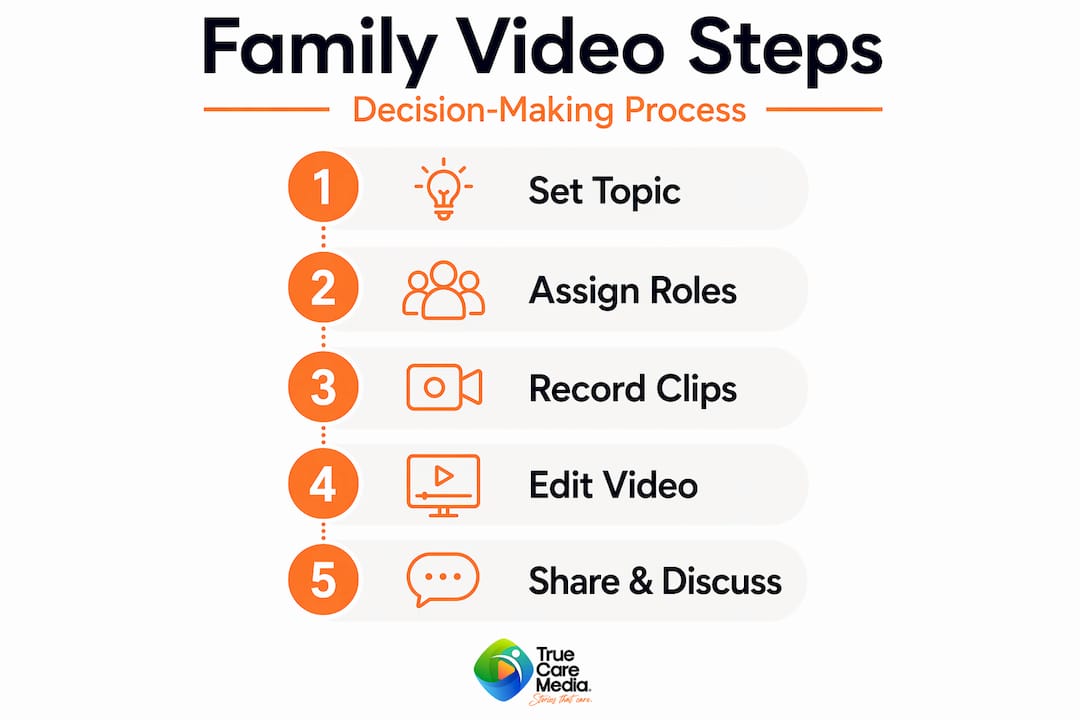
Once preparation is done, the production phase moves quickly. A five-step decision-making framework gives your video a natural structure: clarify values, gather relevant information, include all participants, evaluate the options, then decide and schedule a review.
Here is how that translates into a practical production workflow.
-
Write a short script for each participant (allow 30 minutes). Each person should speak for roughly two minutes on camera. Give them three to four specific prompts in advance, such as “What matters most to you about this decision?” or “What concerns do you want the family to hear?” Specific prompts increase completion rates and produce far more useful footage than a vague “just say what you think.”
-
Collect clips using a shared link (allow three to five days). Rather than trying to schedule everyone at once, use a group video platform that lets contributors record on their own time. Each person follows a link, records their two-minute response, and submits it. No scheduling. No technical drama.
-
Review raw clips before editing (allow one hour). Watch every submission before you open an editing app. Flag clips with audio problems or off-topic content. Note which responses directly address the decision and which introduce new issues that need a separate conversation.
-
Assemble and edit the final video (allow one to two hours). Free tools like iMovie let you trim clips, add title cards to introduce each speaker, and insert a closing slide that names the decision topic, any options under consideration, and the next review date. Keep the final video under fifteen minutes. Families stop watching after that.
-
Export and share for review (allow 15 minutes). Export to a private folder in Google Drive or a similar service. Share the link only with relevant family members. Include a brief written summary of what the video covers so people know what to expect before they watch.
Pro Tip: Stick to one decision topic per video. If a second issue keeps coming up in people’s clips, create a separate video for it later. Focused single-topic videos are easier to edit, easier to watch, and far less likely to create fresh arguments.
For families dealing with healthcare decisions, looking at patient journey video examples can give you a strong sense of how this format translates into real-world care contexts.

Common challenges and how to handle them
Even well-planned family video projects hit friction. Here is what comes up most often and what to do about it.
Delayed or missing contributions
Some family members will not submit their clip by the deadline. This is normal. Send a brief, warm reminder that names the specific prompt and the deadline, and frames it as “your voice matters here” rather than a checklist item. Short, deadline-driven prompts significantly improve participation. If someone still does not respond, offer to record a brief phone call on their behalf and add it as a written note in the companion document.
Emotional or sensitive topics
Some decisions, particularly around medical care, guardianship, or end-of-life planning, carry genuine emotional weight. When filming covers these areas, include explicit question prompts in the script that normalise seeking more information and revisiting the decision. Phrases like “What questions do you still need answered?” give people permission to be uncertain, which is far more honest than forcing artificial consensus.
Technical barriers for less tech-savvy members
An older parent or a family member in a rural area may struggle with uploading a clip. Have a backup plan: a phone call recorded on speakerphone and transcribed is still a valid contribution. The goal is inclusion, not production polish.
“The family member who finds the technology hardest is often the one whose voice matters most to the decision. Build the process around them, not around the platform.”
Audio and video quality issues
Poor audio is the most common technical problem and the hardest to fix in editing. Ask all contributors to film in a quiet room with their phone held at chest height. Two reminders: earphones with a built-in microphone improve audio dramatically, and filming with a window in front of them (not behind) prevents a silhouetted, unreadable image.
Pro Tip: Assign the note-taker role to someone who watches all clips as they come in. They can flag quality issues early and follow up with contributors before you begin editing, saving significant time.
How to share and use the video effectively
A family decision-making video is only useful if people actually engage with it. A single consistent video acts as a reliable source of truth, reducing repeated explanations and contradictory recollections when emotions are running high.
| Sharing method | Best for | Considerations |
|---|---|---|
| Private Google Drive folder | Ongoing storage and easy access | Requires a Google account |
| WhatsApp or Messenger group | Quick sharing with family groups | Not ideal for long-term storage |
| Password-protected video link | Sensitive or legal decisions | Most secure option |
| Played at a live family meeting | Structured group discussion | Best combined with note-taking |
Pairing video with live conversation
Do not replace face-to-face discussion. Play the video together as a group, then pause for questions and reactions. This pairing method works especially well in aged care settings, where a support worker can facilitate the live discussion while the video provides the structured backdrop.
After viewing, assign clear ownership to each decision point. Who is responsible? What is the deadline? What triggers a review? These details, captured in a companion document, are what turn discussion into action.
Creating a companion document
A short written summary alongside the video improves accessibility for family members who are hard of hearing or who prefer to read. It also creates a searchable record. Note the decision topic, each participant’s main point, any unresolved questions, and the agreed next steps. Tools that provide digital family support for caregivers often include templates for exactly this kind of documentation.
Schedule a review date before anyone leaves the meeting. Decisions made under pressure or incomplete information often need revisiting, and a pre-set date makes that feel like a planned step rather than an admission of failure.
A practitioner’s perspective on family decision videos
I have worked with families navigating some of the most stressful decisions imaginable, and what I have seen repeatedly is this: the conversation that happened never matches what everyone remembers. Video fixes that. Not because it is a perfect record, but because it gives everyone the same starting point.
What I have learned is that the facilitator role is the linchpin. A video without a clear facilitator becomes an edited argument. A video with one becomes a structured, respectful document. That role needs to be named before filming starts, not assigned in post-production.
My honest caution is about overloading the format. I have reviewed family videos that tried to cover a living arrangement decision, a financial arrangement, and a medical preference all in one sitting. Nobody watches them twice. Keep the scope tight, accept that more videos will follow, and trust that iteration is how families actually move forward.
Video complements real conversation. It does not replace the phone call, the hug, the long lunch where things get properly worked through. Think of it as the foundation, not the whole building.
— Mishal
How Com can help you get started
If you are supporting a family through a complex care decision and the idea of scripting, filming, and editing feels like too much to manage alone, that is exactly where professional video support earns its value.
Com works with NDIS providers, allied health brands, and aged care organisations to produce video content that builds trust and clarity for the families they serve. From storytelling videos for aged care that help families understand their options, to structured patient experience video formats that document care discussions with clarity, Com brings both the technical skill and the human sensitivity this kind of content demands. If your organisation supports families in making high-stakes decisions, explore how aged care video strategy can make that process clearer, more inclusive, and more effective.
FAQ
What equipment do families need to make a decision video?
A smartphone with a decent camera is enough for most families. Good lighting and a quiet room matter more than expensive gear.
How long should a family decision-making video be?
Aim for under fifteen minutes total. Each contributor speaks for roughly two minutes, and the final edited video should be watchable in a single sitting.
How do you keep everyone’s contribution on topic?
Provide specific written prompts before filming and assign a facilitator to review clips as they come in. Specific, deadline-driven prompts consistently produce more focused, usable responses.
Can video replace a family meeting?
No. Video works best as preparation for or a record of a live conversation. Pairing the video with a structured group discussion produces better outcomes than either approach alone.
How do you handle disagreements that appear in the recorded clips?
Acknowledge them openly in the companion document and treat them as agenda items for the live discussion. Clear decision ownership and a scheduled review date are the most effective way to move past unresolved disagreements.